Home > Resources > Small Business Tech > Organising your digital files
Organising your digital files
A clear file structure saves time, reduces stress and helps you stay productive. Whether you’re working on your own or with a team, a simple system makes it easier to find, manage and back up your files.

Compare the main options
Save time
Find what you need quickly without searching through random folders.
Stay organised
Keep your files in a logical structure that’s easy to maintain.
Work better together
A clear system makes it easier to share files with clients or your team.
Reduce risk
Keep important files safe, backed up and easy to recover.
Start here
A simple folder structure
Keep it simple and consistent. Here’s an example structure you can adapt to your business:
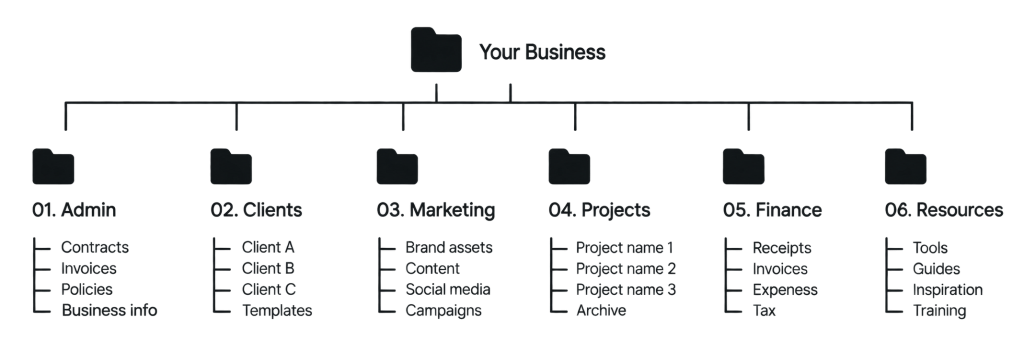
Good file organisation leads to a calmer, more productive you.
Easy to find what you need
Less time wasted
Fewer duplicate files
Smoother collaboration
A more professional business
Start here
Tips for keeping your files organised
1. Use clear folder names
Keep names short, descriptive and consistent.
2. Add dates
Include dates in file names (e.g. 2026-09-20) so they appear in the right order.
3. Be consistent
Use the same structure across all devices and team members.
4. Remove duplicates
Regularly delete old or duplicate files.
5. Back it up
Use cloud storage and an external hard drive for important files.
6. Review regularly
Set a reminder to tidy up your files every few months.
FILE NAMING EXAMPLES
Good vs bad
Good examples
- 2026-09-20_ClientName_Invoice_v1.pdf
- Website_Homepage_Brief_2026-09-01.docx
- SocialMedia_Plan_Oct2026.xlsx
- Logo_FullColour.png
Bad examples
- invoice.pdf
- finalFINAL.docx
- newpost.xlsx
- logo2.png
- screenshot23514.jpg
Get our file structure template
Download a ready-to-use folder structure to help you get started.
DOWNLOAD (zip 5.92KB)
Let’s work together on your
next web project
Every project is a journey, and we are here to guide you every step of the way.